Read the requirements early.
Surface visa sponsorship, clearance, and remote or onsite requirements before investing time in an application.
One private workspace for your next chapter. Tailor your resume, find the right opportunities, and move every application forward.
v1.0.2 desktop preview · Windows x64 · Prefer self-hosting?
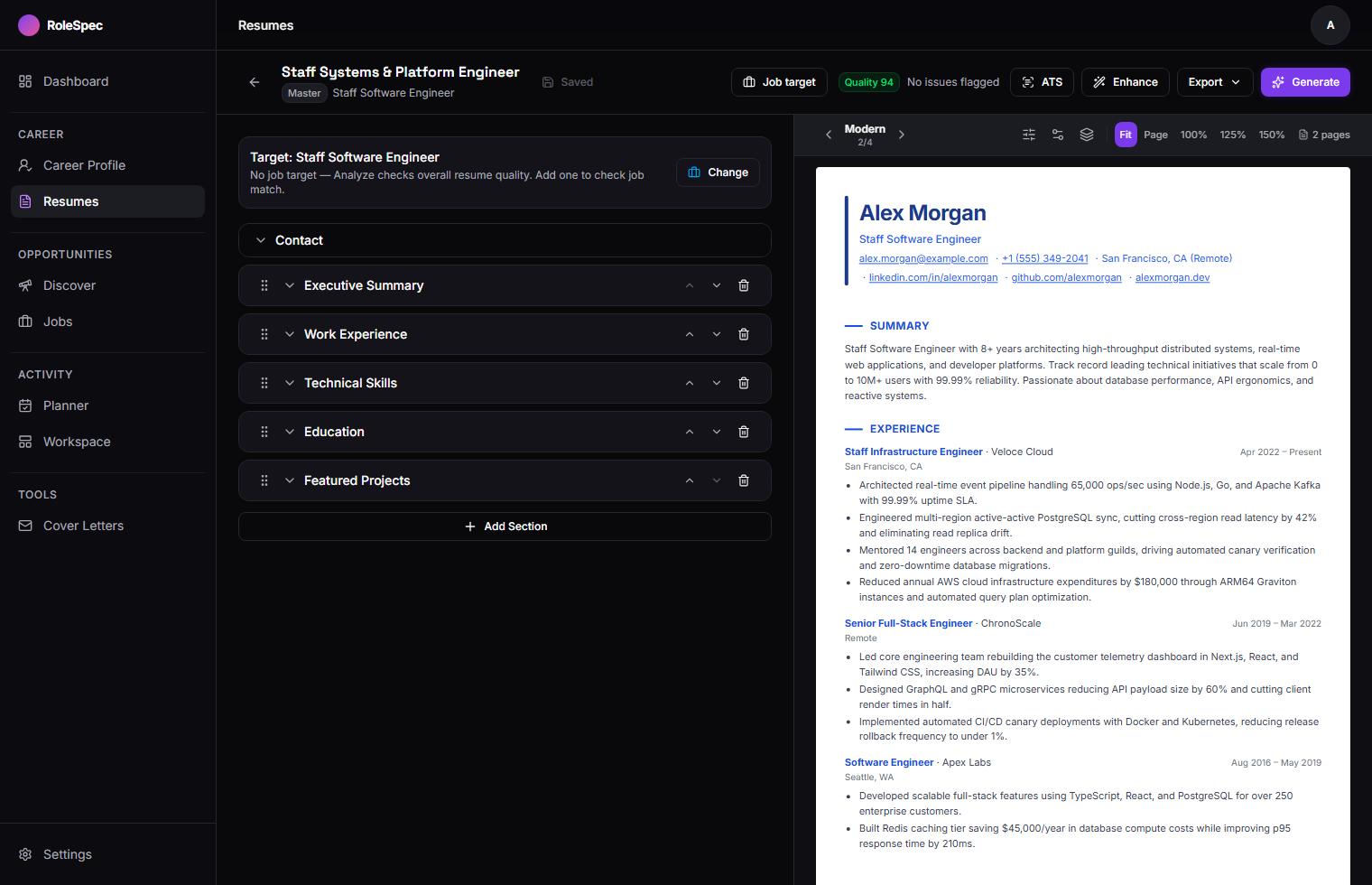
Master resumes, role-specific versions, ATS inspection, and paginated PDF export. Screenshots use sample data. Open full screenshot
Your resume builder, application tracker, and outreach tools belong in the same place. RoleSpec connects the work between them.
Import a resume and build your master career history. Keep your skills, experience, and achievements together.
Save a posting, inspect its requirements, and create a tailored resume from your verified credentials.
Draft your cover letter or outreach, track the application, and plan the follow-up in one workspace.
Keep the full story in your master resume. Create a focused version for each opportunity without rebuilding it from scratch.
A clearer view of your resume, not a promise of passing every employer’s ATS.
Your master resume stays the source.
Each role gets its own focused version.
Switch between Kanban and table views. Keep requirements, follow-ups, and your calendar agenda close to the applications they belong to.
Surface visa sponsorship, clearance, and remote or onsite requirements before investing time in an application.
Heuristic checks flag suspicious redirects, unrealistic compensation, and potential scam or ghost-job signals for your review.
Discover targeted job-board links, then clip a posting into your pipeline with the companion Chrome extension. Keep the description and requirements beside your next action.
Set up the extensionManifest V3 · Built from source · Load unpacked in Chrome, Brave, or Edge
Use a subscription you already have, a local model, free hosted models, or a provider API. First-run setup helps you choose and test the connection.
| Connect with | How it works | Where it runs |
|---|---|---|
| Your subscriptionCodex CLI · Claude Code | Connect an eligible ChatGPT or Claude subscription through its CLI. Provider usage limits still apply. | Host / desktop |
| Free hosted modelsOpenCode | Choose from the zero-cost models discovered by the OpenCode CLI. Availability and rate limits can change. | Host / desktop |
| Your own hardwareOllama · LM Studio | Keep AI processing local with a model running on your own CPU or GPU. | Host / desktop |
| Cloud APIsOpenAI · Anthropic · Gemini · DeepSeek | Bring your own API key. Usage is billed by the provider you choose. | Host / desktop / Docker |
Resume editing and application tracking work without AI. Tailoring, analysis, matching, and generated writing need a working provider. Docker supports cloud API providers; CLI and local-model connections need a host process.
Self-host the workspace and choose where your AI runs. Local models keep AI processing on your hardware; hosted providers receive the prompts you send to them.
The Tauri desktop shell runs the same Next.js server as the web app, with a bundled Node runtime and a private PostgreSQL database. One schema. One migration history.
Install the Windows desktop preview, or run the web app yourself. Your choice of setup, your choice of AI.
Install, open, and complete onboarding. The runtime and private database come bundled. No Docker, Node.js, or environment file to set up.
Download v1.0.2Windows 10/11 x64 · WebView2 required
Start with Docker Desktop. Copy the environment template and configure a cloud AI provider.
git clone https://github.com/Ry0x7/rolespec-os.git
cd rolespec-os
cp .env.docker.example .env.docker
docker compose up -d --build
Open http://localhost:3000. Your private workspace logs you in automatically. CLI subscriptions and local models are unavailable inside Docker.
Requires Node.js 22+ and PostgreSQL. Configure DATABASE_URL and AUTH_SECRET in .env.
git clone https://github.com/Ry0x7/rolespec-os.git
cd rolespec-os
npm install
cp .env.example .env
# Configure .env before continuing
npx prisma migrate dev
npx prisma db seed
npm run dev
Open http://localhost:3100 and complete first-run setup. See the full setup guide for provider configuration.
You can edit resumes and track applications without AI. AI-powered analysis, tailoring, matching, and writing require a connected provider. You choose it during setup.
Your workspace runs on your machine or server. With Ollama or LM Studio, AI processing can stay local too. Subscription CLIs, free hosted models, cloud APIs, and job-board links still use external services.
This is the product showcase. The screenshots are from RoleSpec, not a live workspace. Install the desktop preview or self-host the app to use your own private workspace.
Yes. Bug fixes, workflow improvements, accessibility work, documentation, and desktop packaging contributions are welcome. Start with the contributing guide.
Bring your experience. Keep your context. Make the next application count.